For my CJ… Tracking Miles
This is a simple app designed to keep track of business miles for tax purposes. This app will show a summary by year and provides two methods to export the data.
The Interface
“+” Adds a new event. Here, the date is ‘auto’ assigned (current date), sales tax, total purchase, description, and image. This screen shows all the receipts/expenses logged.
“Edit”, when tapped, changes to edit mode to allow the user to delete a single event.
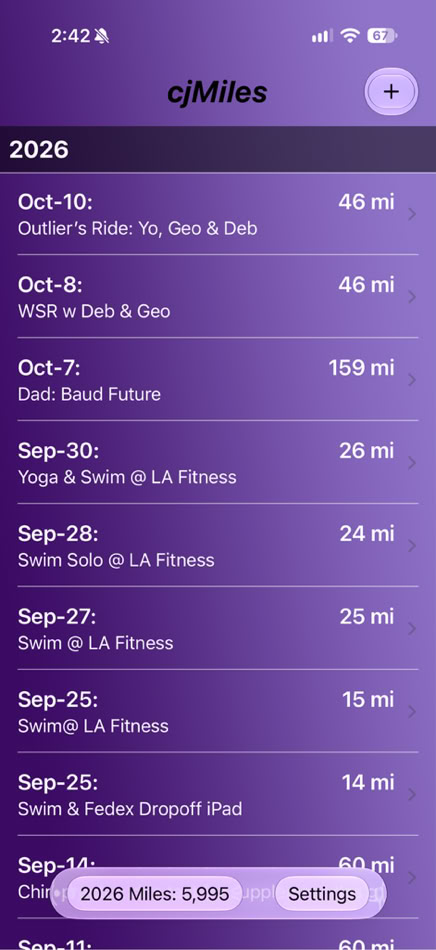
“20xx Miles: yyyy” This is a button that will cycle backwards through all the years (starting with 2026) that mileage exists. This will be the total number of miles logged to date, for that particular year and for the default vehicle.
In the table itself, you can tap a particular record... This will take you to a detail screen that will allow you to change values (ie: date, description, odometer readings).
Please contact me directly if you need any assistance, or direction. If you would like to see something changed, I very much want to hear from you!
VERSION 2.1 RELEASED 2026-October-12
-iOS 27 Support
-Multi-vehicle Support: 3 today
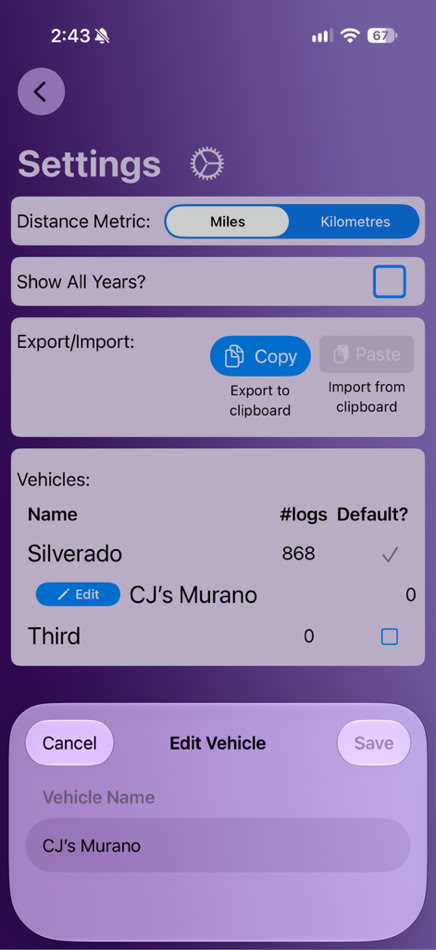
-Edit Vehicle Name
-Mileage Sum by Vehicle: default vehicle is shown. Change in Settings
New Feature Detail
-The screenshot on the bottom left shows the main list of entries
NOTE the buttons on the bottom bar are a different shape
ALSO, the year/miles button decrements the year and the miles calculation
adjusts accordingly.
-The bottom right screenshot illustrates that a “right swipe” for a Vehicle row
presents an Edit button. Upon selection, a small dialog appears providing
the ability to edit the vehicle name. Simply “Save” or “Cancel” to exit back.
Then slide the row back hiding the Edit button.